
Anthropic is developing a dedicated Google Drive file browser for Claude, a move that could make it easier for users to find, organize and work with documents without leaving the AI assistant. The feature was spotted in a test version of Claude and is expected to support browsing Google Docs, Sheets and Slides through a more visual interface.
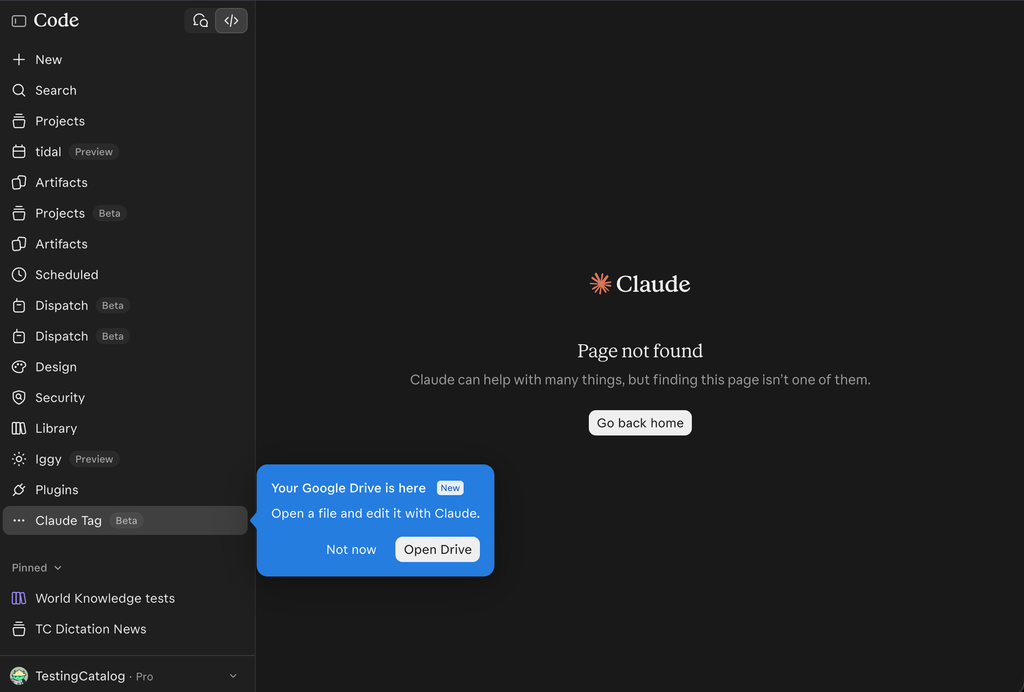
The development has not been officially announced by Anthropic, and its availability and final capabilities remain unknown. However, the reported interface suggests that the company is exploring a deeper integration between Claude and Google Drive, potentially bringing file discovery and management closer to the core Claude experience.
Claude May Get a Dedicated Google Drive Browser
According to a report by TestingCatalog published on November 26, 2026, Anthropic is working on a Google Drive browser that appears as a separate item in Claude’s navigation sidebar.
The reported interface would allow users to browse files stored in their Google Drive accounts. It is expected to display common Google Workspace formats, including Docs, Sheets and Slides, while providing search and filtering options to help users locate specific documents.
At present, users often rely on conversational commands, connectors or file-selection menus to bring Drive content into an AI conversation. A dedicated browser could make this process more direct by allowing users to explore their files visually before deciding which documents to use.
The feature could also make Claude more convenient for people who regularly work with large collections of business documents, research files, spreadsheets and presentations.
File Management Could Become Part of Claude Projects
One possibility raised by the report is that the file browser could eventually become part of Claude’s Projects experience.
Projects allow users to organize conversations and provide Claude with relevant context for ongoing work. Bringing a Drive browser into this environment could make it easier to associate documents with specific projects.
For example, a user working on a market research project could browse Google Drive, locate industry reports and spreadsheets, and add relevant files to the project. Claude could then use those documents as context for analysis, summaries or other tasks.
The reported interface may also support moving files between folders, although this capability has not been confirmed by Anthropic. The final design could differ from what has appeared in testing.
Integrating file browsing with Projects would also fit into Anthropic’s broader effort to make Claude useful across longer, multi-step workflows rather than limiting it to individual chat sessions.
Claude Already Supports Google Drive Integration
The reported file browser would build on capabilities that Claude already offers through its Google Workspace connectors.
Anthropic’s Help Center documentation says users can connect Google Drive to Claude to search for and retrieve documents. Claude can also read spreadsheets, presentations, PDFs, images and Microsoft Office files stored in Drive.
Users can add Google Docs to conversations and Projects by pasting links or selecting documents. Claude can also move, share and trash Drive files, create folders, and save generated files to Google Drive when the required features are enabled.
The company also supports separate Google Docs, Sheets and Slides connectors. These allow Claude to create and edit supported Google files, including through a live editing pane alongside the conversation.
The important distinction is that these existing connectors already provide access to Drive content and file operations. The reported browser appears to focus on the interface: giving users a dedicated place to browse and discover files instead of relying primarily on chat commands or selection menus.
Google Workspace Is Becoming More Closely Connected to AI
Anthropic has been expanding Claude’s presence across Google’s productivity tools.
In October 2026, the company announced Claude for Google Workspace, which brought Claude into Google Docs, Sheets and Slides through an add-on and introduced connectors for working with these files directly from Claude.
The integration allows users to work with documents in their existing Google Workspace environment. In Docs, Claude can suggest or apply changes to selected text. In Sheets, it can help write formulas, create pivot tables and build charts. In Slides, it can generate presentations using existing layouts and themes.
The reported file browser would extend this approach in the opposite direction. Rather than bringing Claude into an open Google file, it could bring a user’s Drive library into Claude’s own interface.
That distinction matters for workflows involving multiple documents. Users could potentially begin in Claude, find the relevant files and then ask the assistant to analyze or work across them.
How the Feature Could Help Users
A visual file browser could make several common workflows easier.
| Potential use case | How it could help |
|---|---|
| Research | Find reports and reference documents without switching applications |
| Business analysis | Locate spreadsheets and use them as context for financial or operational analysis |
| Project management | Associate relevant files with individual Claude Projects |
| Document creation | Find source material before drafting or updating documents |
| File organization | Potentially manage folders and move files, if supported in the final release |
For businesses, the benefit could be particularly relevant to teams that store large amounts of information in Google Drive. Employees frequently need to locate previous reports, presentations, meeting documents and spreadsheets before starting new work.
A more direct interface could reduce the steps involved in bringing those materials into an AI workflow.
However, the actual productivity gains will depend on the feature’s final capabilities, including how it handles permissions, shared drives, file previews and large collections of documents.
Competition With ChatGPT’s Workspace Features
Anthropic’s development also reflects growing competition among AI assistants to become broader productivity platforms.
OpenAI has been developing workspace features that allow users to work with connected files and organize AI-assisted tasks. ChatGPT’s Google Drive capabilities similarly aim to make external documents more accessible within its environment.
The comparison is not necessarily one-to-one. Different products may offer different combinations of file discovery, document editing, project organization and permissions management.
Still, the direction is clear: AI assistants are increasingly competing on how well they connect to the tools and information people already use, not just on the quality of their text or reasoning.
For Anthropic, a dedicated Drive browser could make Claude feel more like a central workspace for research and business tasks.
The Bigger Picture
The development points to a broader shift in the AI software market. Instead of requiring users to move between cloud storage, productivity applications and chat interfaces, AI companies are trying to bring more of those activities into a single environment.
File browsing is a relatively practical feature, but it can become an important part of an AI workflow. Finding the right document is often the first step in preparing a report, analyzing a business or completing a project. Making that process easier could encourage users to rely on Claude for more of their daily work.
However, the feature remains in development, and a test interface does not guarantee a public release. Anthropic has not confirmed its final capabilities, supported plans or rollout schedule.
Looking Ahead
The next important development will be whether Anthropic formally introduces the Google Drive browser and explains how it will work with Claude Projects. Support for searching, filtering, previewing and organizing files could determine whether it becomes a meaningful upgrade over the existing connector experience.
If released, the browser could strengthen Claude’s position as a productivity workspace for users who depend on Google Workspace. For now, users can continue connecting Google Drive through Claude’s existing connectors, while the reported dedicated browsing experience remains unconfirmed.
Get the day’s top stories in your inbox
One concise email. No spam, unsubscribe anytime.


